Your Database Will Fail. Here’s How to Prepare: 4 Levels of SQL Server Resilience
It’s 7 PM on a Saturday night. The restaurant is packed, orders are flying into the kitchen, and the energy is electric. Suddenly, the screens at the ordering stations go blank. The kitchen printer stops. The point-of-sale system, powered by a single SQL Server database, has failed. Every order taken in the last hour vanishes. The front of house is in chaos, the kitchen is at a standstill, and frustrated customers are starting to walk out.
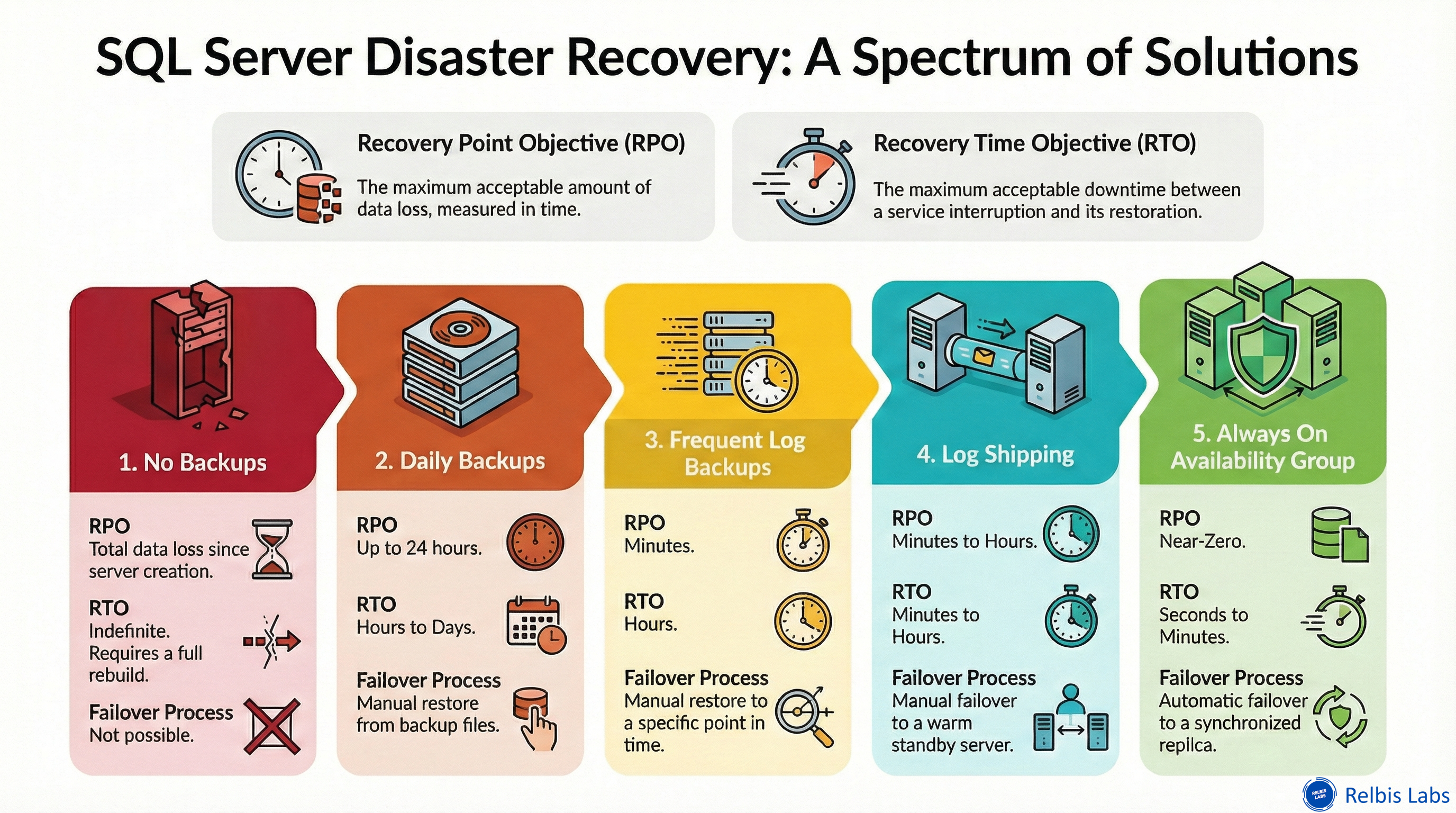
This scenario illustrates the unacceptable cost of downtime and data loss. To prepare for and recover from such a disaster, we measure our resilience using two critical metrics:
- Recovery Time Objective (RTO): The maximum acceptable delay (defined by your organization) between the interruption of service and the restoration of service. In short, how long can your business afford to be down?
- Recovery Point Objective (RPO): The maximum acceptable amount of time (defined by your organization) since the last data recovery point. In other words, how much data can you afford to lose?
There is no one-size-fits-all solution for database resilience; it's always a trade-off between cost, complexity, and business continuity. This article will walk you through four evolutionary steps to take a simple SQL Server setup from vulnerable to highly resilient, exploring the trade-offs at each stage.
Level 1: The Essential Safety Net (Daily Backups)
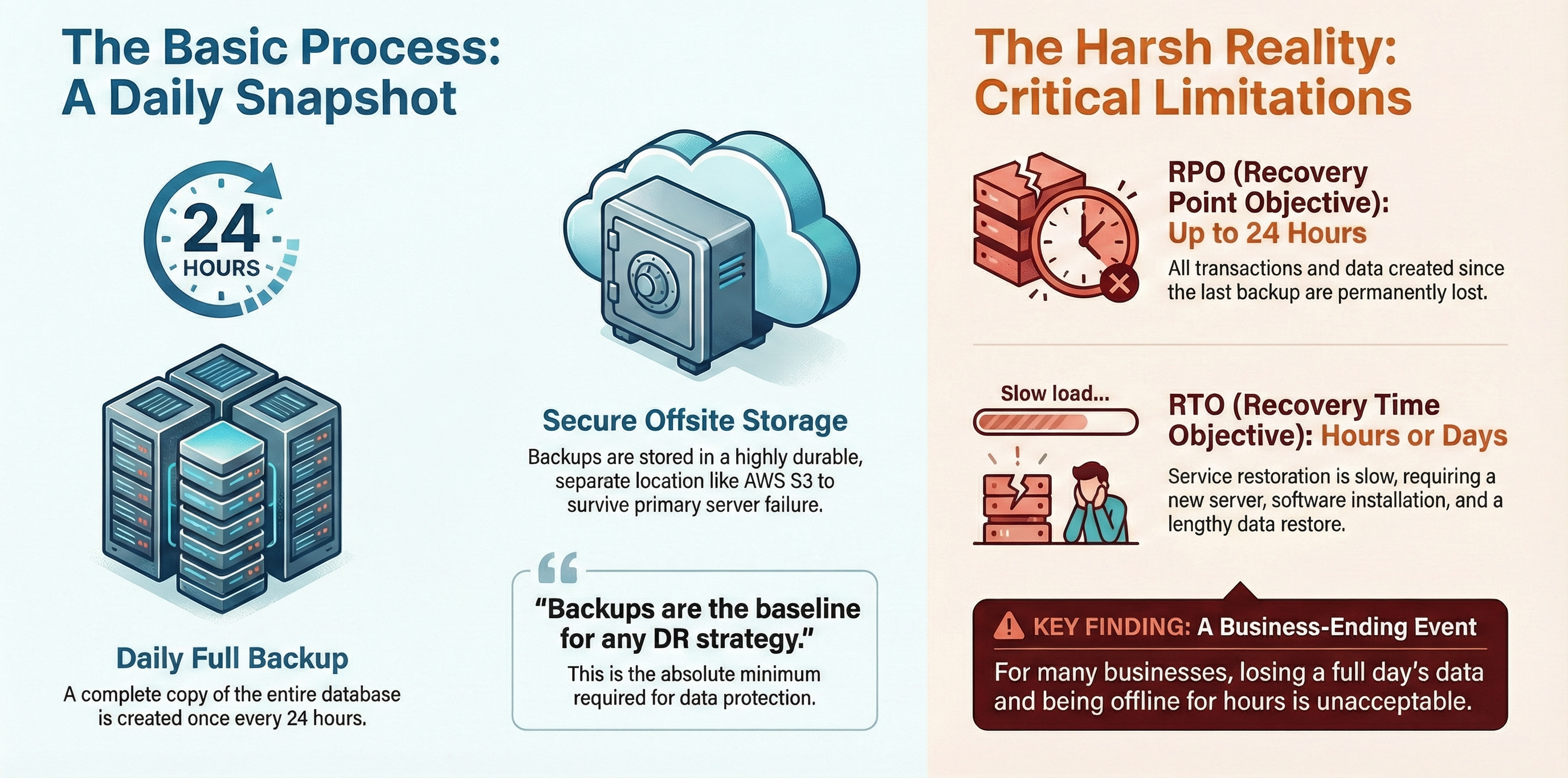
The restaurant’s initial setup is the most basic: a single server running SQL Server. To protect against total data loss, they perform a full database backup once every 24 hours. Crucially, these backups are stored in a highly durable, separate location, such as AWS S3, to ensure they survive the failure of the primary server.
This approach is the absolute baseline for any disaster recovery strategy. However, its limitations are severe. The RTO is measured in hours or days, as a new server must be provisioned, the operating system and SQL Server installed, and the massive backup file restored. The RPO could be up to 24 hours, meaning all transactions since the last backup are permanently lost.
For the restaurant, this is a catastrophe. Losing an entire day's worth of orders and being offline for hours during peak service is a business-ending event.
Level 2: Reducing Data Loss with Transaction Logs
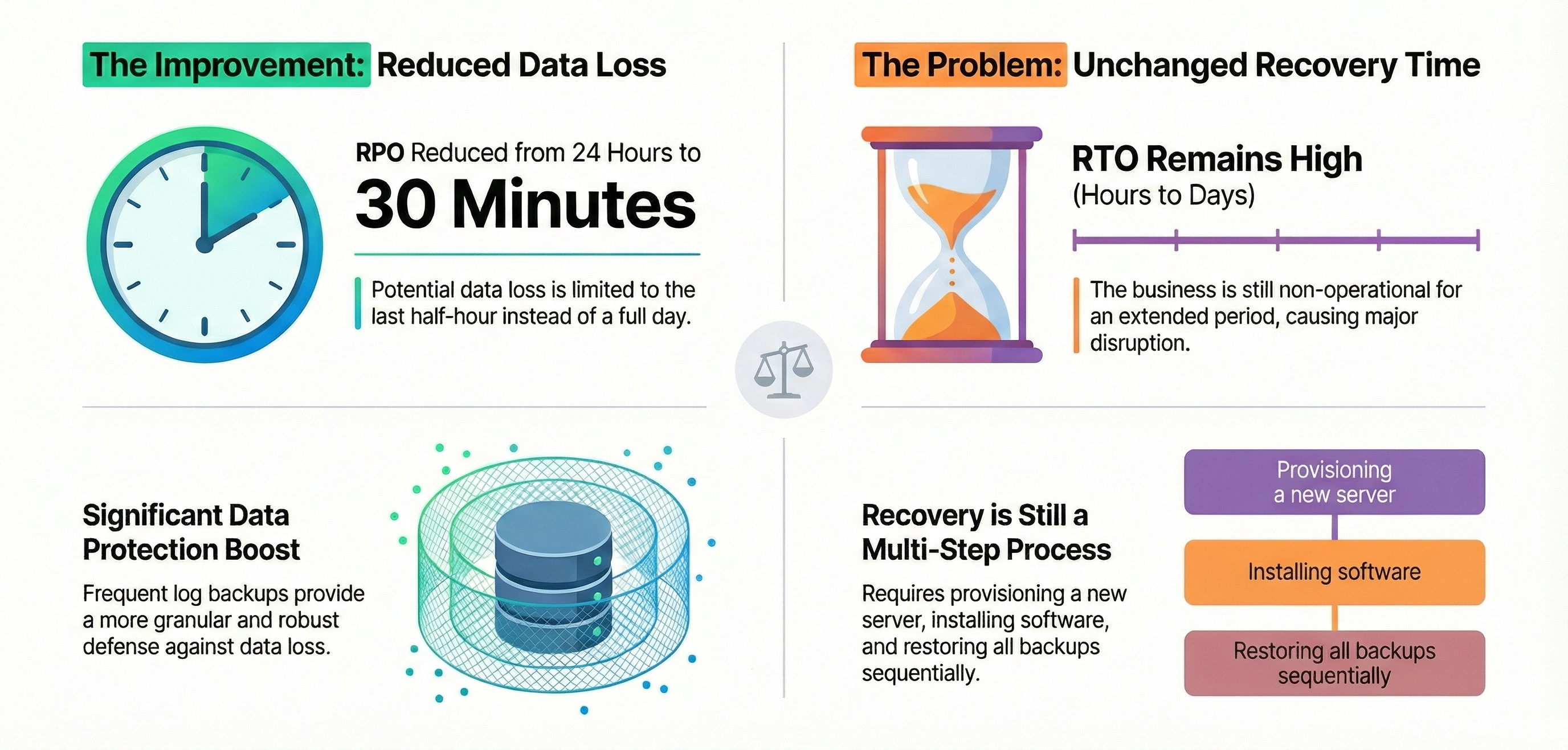
The next logical step is to supplement the daily full backups with frequent transaction log backups. By configuring the database to use the Full recovery model, the restaurant can now back up the transaction log every 30 minutes. This database setting is essential because it ensures every transaction is fully logged, making it possible to create these granular log backups.
This dramatically improves one half of the equation. The RPO is reduced from 24 hours to just 30 minutes. Instead of losing a full day of business, they would only lose the orders from the last half-hour. This is a significant improvement in data protection.
However, the RTO remains high, measured in hours or days. Even with more recent data available, the recovery process is the same: provision a new server, install software, restore the last full backup, and then apply every subsequent transaction log backup in sequence. While less data is lost, the restaurant is still non-operational for an extended period, causing major disruption.
Level 3: Slashing Downtime with Log Shipping
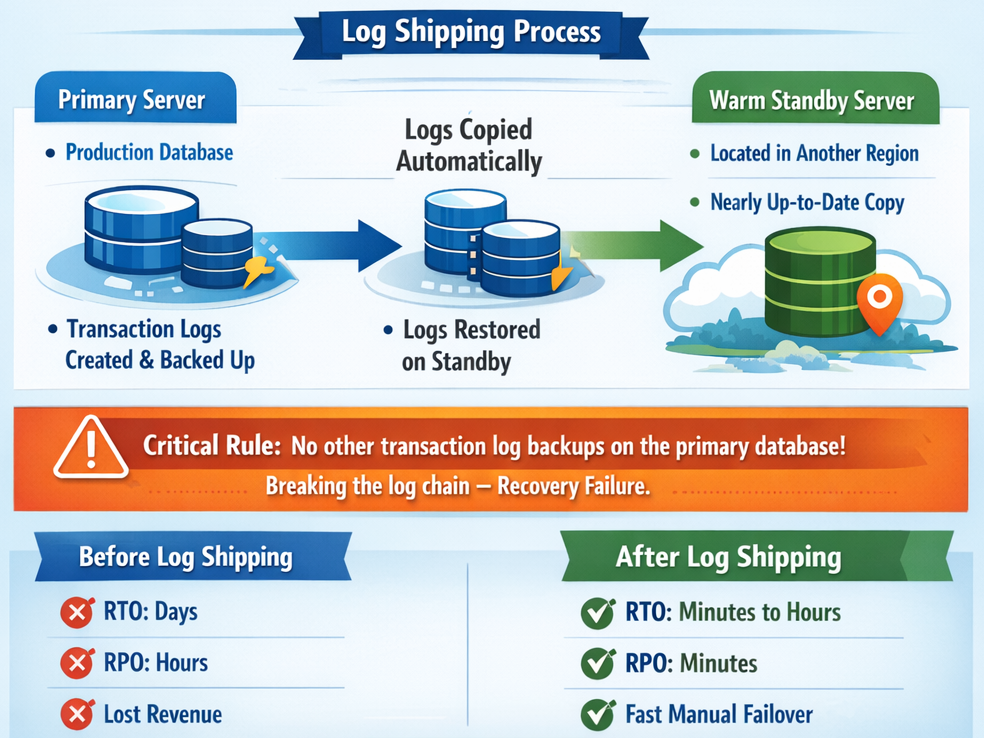
To tackle the long recovery time, the next step is to introduce a "warm standby" server using SQL Log Shipping. This process automatically copies the transaction log backups from the primary server and applies them to a secondary server. For robust disaster recovery, this secondary server can be located in a different geographic region, such as a separate AWS region.
However, this approach comes with a critical operational rule: you cannot take any other transaction log backups on the primary database outside of the ones used for log shipping. Doing so would break the log chain and disrupt the entire recovery process.
This is the first solution that fundamentally improves the RTO. Because the standby server is already provisioned and kept nearly up-to-date, the recovery time is now measured in minutes or hours, not days. The process still involves a manual failover to bring the secondary server online, and the RPO is still measured in minutes (representing any transactions that occurred since the last log was shipped).
For the restaurant, this is a game-changer. An outage that previously would have shut them down for the night can now be resolved relatively quickly, minimizing financial loss and operational chaos.
Level 4: Achieving Near-Zero Downtime with Always On Availability Groups
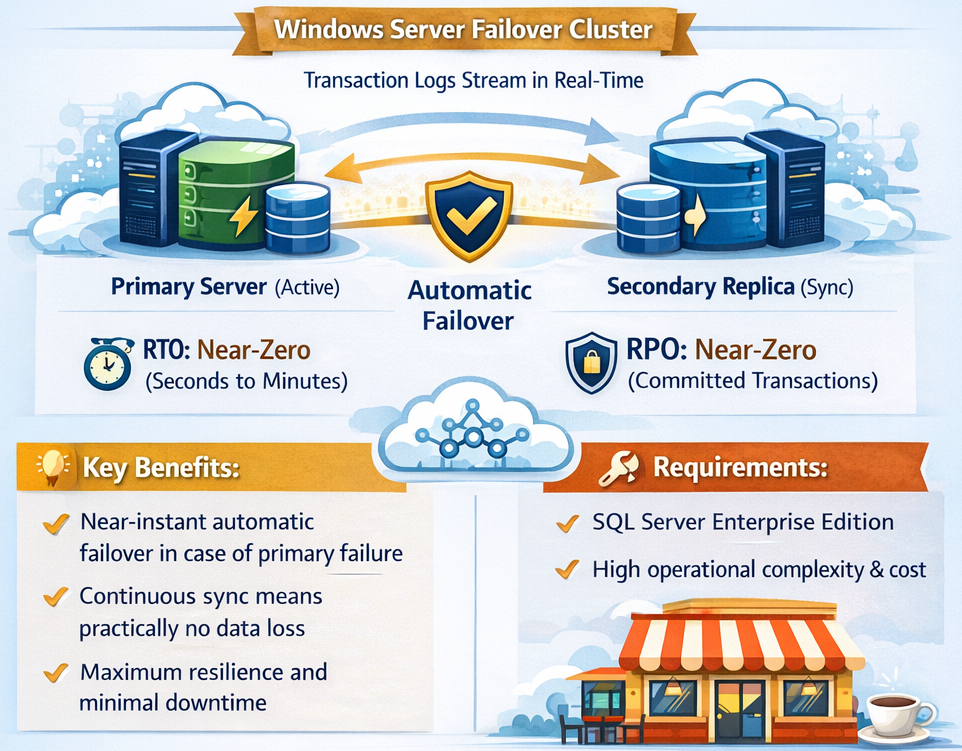
The most advanced solution involves setting up a SQL Server Always On Availability Group on a Windows Server Failover Cluster. In this configuration, the system works by sending a continuous stream of transaction log records from the primary to a secondary server (or "replica"), keeping it in a constant state of sync.
By using synchronous-commit mode, every transaction must be written to both the primary and secondary replicas before it is confirmed. This provides the ultimate level of protection. In the event of a failure, the failover to the secondary replica is automatic.
This approach delivers the best possible resilience metrics. The RTO is reduced to seconds or minutes, and the RPO is effectively zero for committed transactions, meaning no data loss is expected. Of course, this solution also represents the highest level of operational complexity and cost, requiring SQL Server Enterprise Edition and a more intricate infrastructure.
For the restaurant, this is the gold standard. A primary server failure would trigger an automatic failover so fast that the staff and customers might not even notice the disruption. Orders would continue to flow, and business would proceed as usual.
Conclusion: Choosing Your Level of Resilience
We've journeyed from a basic setup with an RTO of days and an RPO of 24 hours to an advanced architecture with an RTO of seconds and a near-zero RPO. Each level offered better protection at the cost of increased complexity and expense.
There is no single right answer. The appropriate level of resilience depends entirely on your business needs. The key is to consciously evaluate the trade-offs between your requirements for RTO and RPO and the cost and operational complexity you are willing to accept.
Looking at your own critical systems, where on this journey do you need to be, and where are you today?
Have a question or suggestion?
There is more than one way to start a conversation:
- Create a post in our Reddit community.
- Fill out the form.
- Send us an email: info@relbis.com